
Getting Started
What Club NYC is, what you need to play, and how your first five minutes in the city go.
Welcome to New York! Club NYC is a pocket-sized Manhattan you can hang out in with real people. Here’s everything you need to get going.
What You Need
- A computer. Club NYC plays in a web browser on a laptop or desktop. Chrome, Edge, Firefox and Safari all work. Phones and small tablets aren’t supported yet (the city needs a keyboard and a bigger screen). See Can I play on my phone?
- Nothing to download. Go to the Club NYC website and press Play Now.
- No account. You start as a guest. You can link Google, X or Discord later to keep your New Yorker on every device.
- Age 13 or older. We ask for your birth month and year once, to check. We don’t keep them.
Your First Five Minutes
- Make your New Yorker. Pick a look and a name. It takes about 30 seconds. How it works
- Meet Rosa. Your building’s super gives you a four-step tour: walking, clicking things that glow, chatting and getting around. Your first day
- Grab your welcome gift. Sal’s hot dog cart in Times Square has a free gift for every new New Yorker.
- Explore. Walk through the exits, open the Map (M) or ride the Subway (U). Anything that glows when you point at it can be clicked.
- Earn some coins. Work a shift at one of the jobs, like Slice Factory at Joe’s Pizza in Little Italy.
The Screen at a Glance
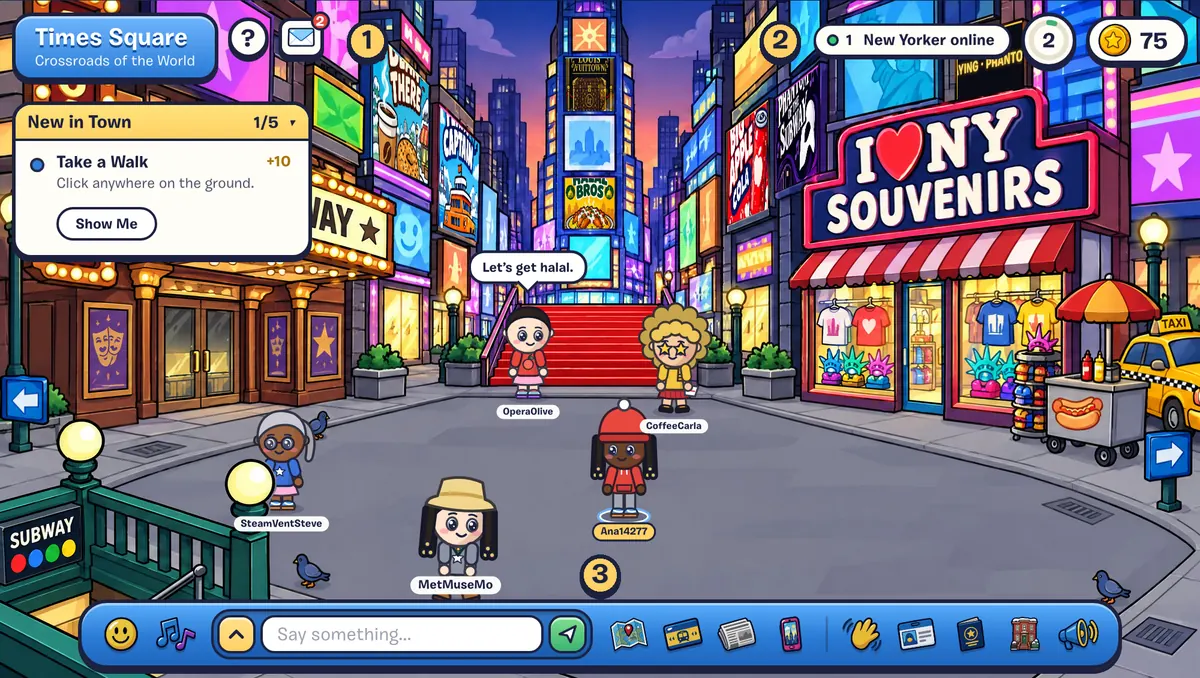
| Where | What it shows | |
|---|---|---|
| 1 | Top left | The place you’re in, the ? button (replays the tour), your postcards, and your first-day list |
| 2 | Top right | Who’s online, your level ring and your coins |
| 3 | Bottom | The toolbar: emotes, moves, chat, map, subway, the paper, your phone, friends, your player card, stamps, home and sound |